Thursday, September 24, 2026
22 check-insThis Week's Question
“If requested as a requirement for the SET, could you send a Field Situation Report using the built-in forms in Winlink?”
“Can you fill out an ICS-214 Activity Log and send it to us via Winlink?”
SET Prep: Winlink Forms - Field Situation Report & ICS-214 Activity Log
Introduction
The Simulated Emergency Test (SET) is coming up, and this week we're focusing on two Winlink skills you may be asked to demonstrate: sending a Field Situation Report and completing an ICS-214 Activity Log - both using the templates built right into Winlink.
Neither form is difficult, but the middle of an exercise is the wrong time to be hunting through menus for the first time. Take a few minutes this week to open each form, look it over, and even send a practice message.
Question #1: Field Situation Report
“If requested as a requirement for the SET, could you send a Field Situation Report using the built-in forms in Winlink?”
The Field Situation Report is a standard Winlink template used to report conditions from your location - things like power, communications, road status, and observed damage. Here's where to find it in Winlink Express:
- Click New Message (the blank-page icon in the top-left).
- In the message window, click Select Template.
- Expand General Forms.
- Double-click Field Situation Report, fill out the form in your browser, and submit it back to Winlink.
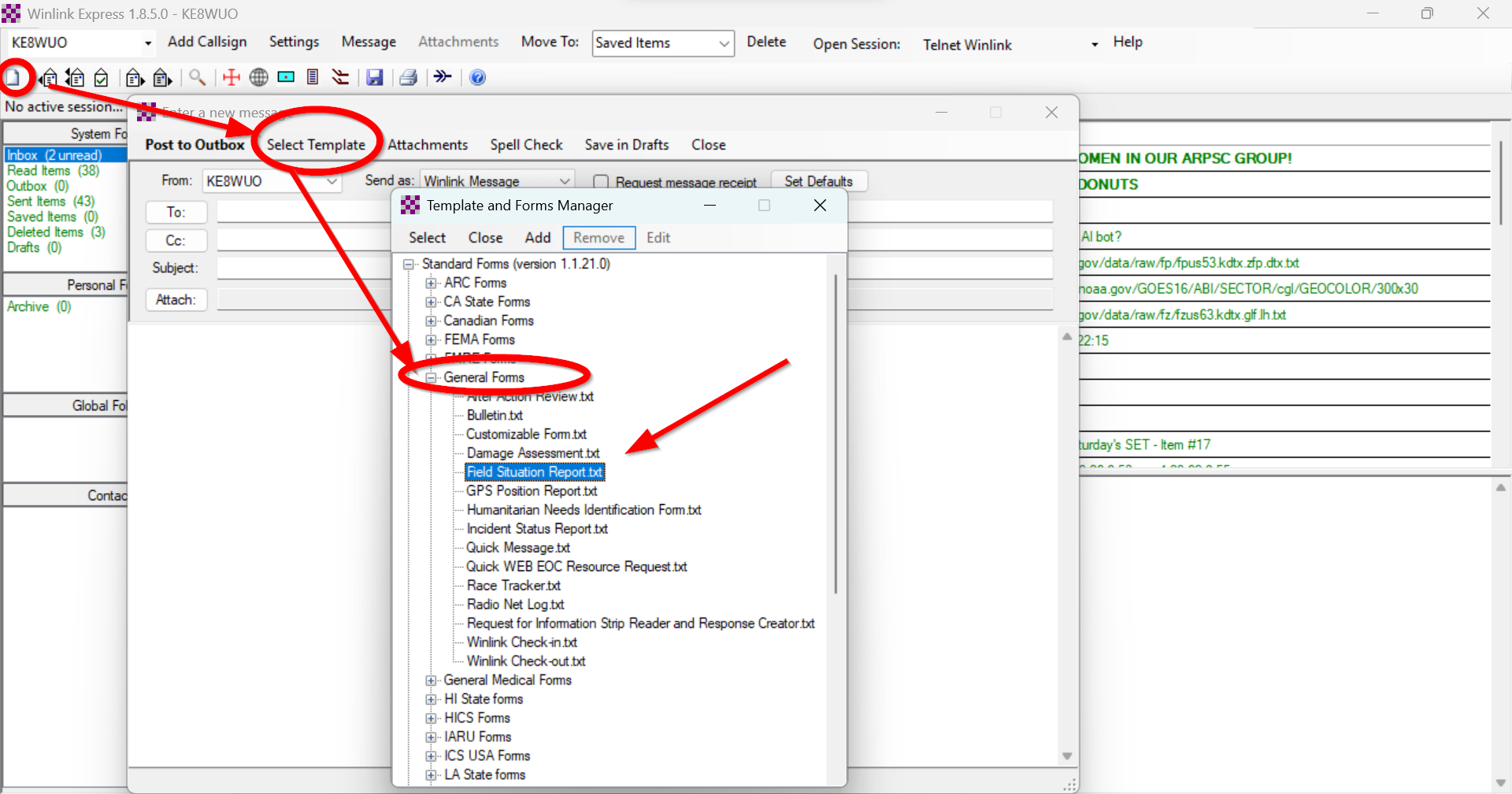
New Message → Select Template → General Forms → Field Situation Report
Question #2: ICS-214 Activity Log
“Can you fill out an ICS-214 Activity Log and send it to us via Winlink?”
The ICS-214 is your personal activity log for the event. For the SET, we want you to capture all notable events from the moment you leave your house until the moment you arrive back home. This form lives in a different folder than the Field Situation Report:
- Click New Message.
- Click Select Template.
- Expand ICS USA Forms.
- Double-click ICS214 Activity Log, fill it out, and send it to us via Winlink.
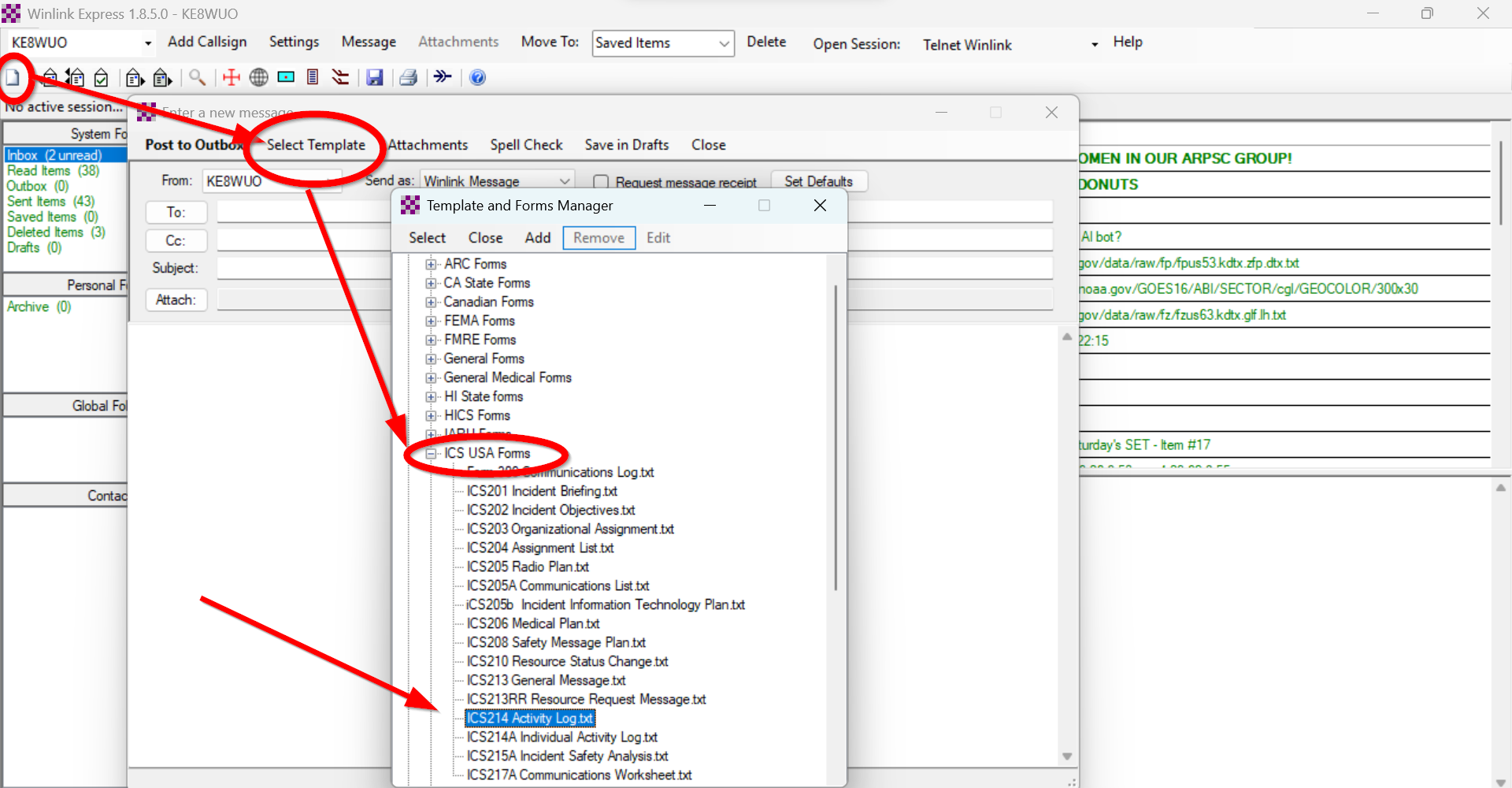
New Message → Select Template → ICS USA Forms → ICS214 Activity Log
Update Winlink BEFORE the SET
Open Winlink Express before the SET and let it pull down all of its updates - including the latest template/forms updates. You do not want to spend your day in the field waiting on downloads instead of sending reports. Fire it up this week, let it update, and confirm you can open both forms.
Winlink downloads for every platform:
- Winlink Express (Windows) - the full desktop client
- Woad - Winlink for Android (Google Play)
- RadioMail (iOS App Store)
Get a Time-Stamped Photo App
You'll also want a camera app that stamps the date and time (and ideally GPS location) directly onto your photos. This makes your field documentation verifiable and easy to match against your ICS-214 entries. A few options:
Your SET Prep Checklist
- Open Winlink Express and let it download all updates
- Find and open the Field Situation Report (General Forms)
- Find and open the ICS-214 Activity Log (ICS USA Forms)
- Install a time-stamped photo app on your phone
- Plan to log your odometer when you leave home and when you return
Check-In List
| # | Call Sign | Unit # | Name | City | Member |
|---|---|---|---|---|---|
| 1 | KE8LAX | 22 | Dean | New Haven | Member |
| 2 | KE8WUO | 20 | John | Warren | Member |
| 3 | W8VOX | 30 | Jon | Macomb | Member |
| 4 | N8BZR | 27 | Brian | Harrison Township | Member |
| 5 | KE2BNY | 47 | Devin | Warren | Member |
| 6 | N8VDZ | 2 | Mike | Warren | Member |
| 7 | K8WA | 19 | Bill | Warren | — |
| 8 | N8XZ | 5 | Ron | Warren | — |
| 9 | N8WCB | 6 | Dave | Sterling Heights | — |
| 10 | AD8MP | 35 | David | Saint Clair Shores | Member |
| 11 | W8BPD | 24 | Brian | Warren | Member |
| 12 | KF8ETQ | 23 | Darren | Fraser | Member |
| 13 | KF8FQZ | 41 | Lisa | Warren | — |
| 14 | N8HLY | 12 | Tom | Sterling Heights | Member |
| 15 | KF8FGS | 32 | David | Utica | Member |
| 16 | KE8YNU | 1 | Dave | New Haven | Member |
| 17 | N8WRO | 10 | Tim | Richmond | Member |
| 18 | KC8KJO | 14 | Tom | Memphis | — |
| 19 | N8CAF | 26 | Cliff | Clinton Township | Member |
| 20 | WC8E | 8 | Jeff | Sterling Heights | Member |
| 21 | N8KJV | 38 | Jason | Warren | — |
| 22 | KE8RUH | 43 | Anthony | Grosse Pointe Woods | Member |