FEMA Documents & Common Forms
Learn how to properly complete the standardized forms used in emergency communications. Each guide includes field-by-field explanations and practical tips.
Click on a section below to expand it and view the available forms.
Winlink forms are used for digital message handling during exercises and real-world activations. Click on any form below to view the field-by-field guide.
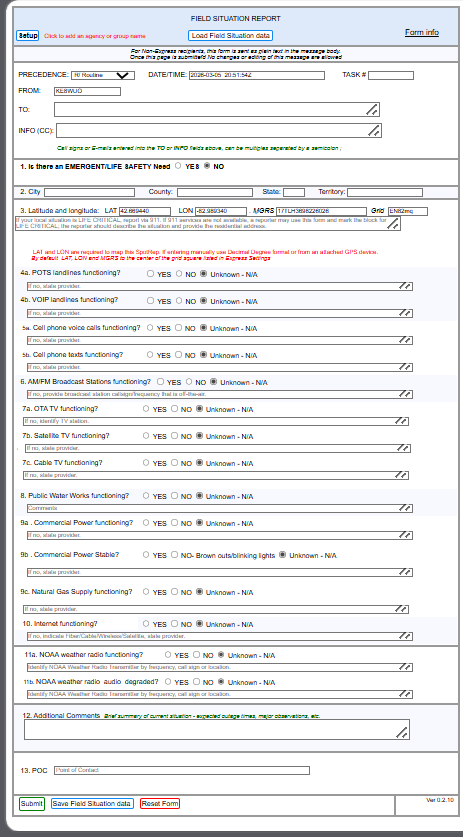
How to access: In Winlink Express, click Select Template → General Forms → Field Situation Report
Field-by-Field Guide
Not sure what a field means or how to fill it out? Here's a quick reference for each section of the form:
- PRECEDENCE
- Message priority level. R/Routine is the default. Use P/Priority for urgent but non-life-threatening info, I/Immediate for time-critical situations, or LIFE/CRITICAL for life-safety emergencies.
- DATE/TIME
- Auto-filled with current date and time when you open the form.
- TASK #
- Optional. Leave blank unless you've been assigned a specific task number for tracking.
- FROM
- Your callsign (auto-filled from Winlink).
- TO
- The recipient. Typically
MICH-50EOCfor exercises. - INFO (CC)
- Carbon copy recipients. Add additional callsigns as needed.
Select YES if you're aware of an immediate life-threatening situation or emergency requiring urgent response in your area.
If YES, also set PRECEDENCE to LIFE/CRITICAL.
- City
- Your city or township (e.g., Warren, Sterling Heights, Clinton Twp).
- County
- Your county (e.g., Macomb).
- State
- MI (Michigan).
- LAT / LON
- Your latitude and longitude. You can get this from Google Maps, your phone's GPS, or a handheld GPS unit.
- MGRS
- Military Grid Reference System — An alternative coordinate format used by military/emergency services. Optional; leave blank if you don't know it.
- Grid
- Your amateur radio grid square (e.g., EN82). Optional.
- POTS
- Plain Old Telephone Service — Traditional copper wire landline phones. These work even during power outages (the phone company powers them). If you have a landline plugged into a wall jack that isn't internet-based, that's POTS.
- VoIP
- Voice over Internet Protocol — Phone service that runs over the internet. Examples include Vonage, Ooma, MagicJack, or phone service bundled with your internet. These require power and internet to work.
Select YES if working, NO if not working, Unknown if you're not sure, or N/A if you don't have that service.
- Voice calls
- Can you make and receive regular phone calls on your cell phone?
- Texts
- Can you send and receive SMS text messages? (Not iMessage or other app-based messaging)
Note your carrier in the text field (e.g., AT&T, Verizon, T-Mobile).
Are local AM and FM radio stations coming in clearly? Can you pick up stations like WWJ 950, WJR 760, or local FM stations?
If you can, note which station(s) you checked in the text field.
- OTA TV
- Over-The-Air Television — Free TV received via an antenna (like the old "rabbit ears" or a rooftop antenna). Channels like 2, 4, 7, 50, 62, etc. No subscription required.
- Satellite TV
- TV service from a satellite dish. Providers include DirecTV and Dish Network.
- Cable TV
- TV service delivered through a coaxial cable from providers like Xfinity/Comcast, WOW, or bundled with your internet.
Is your municipal water supply working? Turn on a faucet—do you have water pressure? Is the water clear?
If you have a private well, you can note that and report whether your well pump is working.
- Power functioning?
- Do you have electricity? Are your lights on?
- Power stable?
- Is power steady, or are you seeing brownouts (dimming lights), flickering, or brief outages?
- Natural gas?
- If you have natural gas service, is it working? (Check your stove, furnace, water heater, etc.)
Is your internet working? This includes cable internet (Xfinity, WOW), fiber (AT&T Fiber, Verizon Fios), DSL, fixed wireless, or satellite internet (Starlink, HughesNet).
Note your provider in the text field.
NOAA Weather Radio is a nationwide network of radio stations broadcasting continuous weather information from the National Weather Service on special frequencies (around 162 MHz).
- Functioning?
- Can you receive the NOAA Weather Radio broadcast? Local transmitters include KXI-67 (162.475 MHz, Ann Arbor) and WXL-93 (162.550 MHz, Detroit).
- Audio degraded?
- Is the audio quality poor, scratchy, or cutting in and out?
If you don't have a weather radio, select "Unknown" or "N/A."
Use this space for any additional observations:
- Expected outage times if known
- Major observations (downed trees, flooding, road closures)
- Summary of current situation
- Anything else Emergency Management should know
Enter your name or callsign as the Point of Contact for this report. This identifies who submitted the report if follow-up is needed.
How to access: In Winlink Express, click Select Template → Standard Templates → Check In
Field-by-Field Guide
- TO
- The tactical address or net control station. For ARPSC exercises, typically
MICH-50EOCor as directed. - FROM
- Your Winlink callsign (auto-filled).
- SUBJECT
- Auto-generated based on form type. Usually "Check In - [Your Callsign]".
- Callsign
- Your amateur radio callsign (e.g., W8ABC).
- Name
- Your full name as you want to be identified.
- Assignment
- Your current assignment or "Staging at Home" if on standby. Examples: "EOC Radio Room", "Field Station Alpha", "Mobile Unit 3".
- Contact Info
- Phone number or alternate contact method if available.
- City/Location
- Your city or specific location (e.g., "Sterling Heights" or "Macomb County EOC").
- Grid Square
- Your Maidenhead grid locator (e.g., EN82). Optional but helpful for mapping.
- Coordinates
- LAT/LON if available. Can be obtained from your phone's GPS or Google Maps.
- Radio Equipment
- List your available radios (e.g., "Yaesu FT-891 HF, Kenwood TM-V71A VHF/UHF, HT"). Include power output capabilities.
- Antenna
- Type and height of antenna (e.g., "G5RV at 35ft", "J-pole at 20ft").
- Power Source
- How you're powered: "Commercial AC", "Generator", "Battery backup for X hours", "Solar".
- Digital Modes
- List capabilities: "Winlink (Telnet/Packet/VARA)", "FLDIGI", "JS8Call", etc.
- Available Until
- How long you can remain on duty (e.g., "2200 local", "Next 4 hours", "Indefinitely").
- Mobility
- Can you deploy if needed? "Fixed only", "Mobile capable", "Can deploy with 1 hour notice".
- Comments
- Any additional information: limitations, special skills, vehicle type, etc.
How to access: In Winlink Express, click Select Template → Standard Templates → Check Out
Field-by-Field Guide
- TO
- Same tactical address you checked in with. For ARPSC exercises, typically
MICH-50EOC. - FROM
- Your Winlink callsign (auto-filled).
- SUBJECT
- Auto-generated. Usually "Check Out - [Your Callsign]".
- Callsign
- Your amateur radio callsign.
- Name
- Your full name.
- Assignment
- The assignment you're checking out from.
- Check-in Time
- When you originally checked in (e.g., "1900 local" or "19:00 EDT").
- Check-out Time
- Current time when you're signing off.
- Total Hours
- Total time on duty (helps with volunteer hour tracking).
- Messages Sent
- Number of formal messages originated or relayed.
- Messages Received
- Number of formal messages received.
- Contacts Made
- Number of radio contacts/QSOs during the period.
- Activities
- Brief summary of what you did: "Monitored 147.200, sent 2 FSR forms, relayed 1 ICS-213".
- Equipment Status
- Any issues with your equipment to note for future reference.
- Replacement
- Callsign of your replacement if applicable, or "N/A" if no handoff.
- Pending Items
- Any outstanding tasks or messages awaiting response.
- Comments
- Any other relevant information for the record.
Incident Command System (ICS) forms are standardized documents used nationwide for managing incidents. These forms ensure consistent communication across agencies.
Field-by-Field Guide
- 1. Incident Name
- A brief, descriptive name for the incident (e.g., "Oak Street Structure Fire", "June 2024 Derecho Response").
- 2. Incident Number
- Agency-assigned incident number for tracking and documentation.
- 3. Date/Time Initiated
- When the incident started or when response began.
- 4. Map/Sketch
- A simple map or sketch showing the incident location, key features, access routes, and staging areas. Include a north arrow and scale if possible.
- 5. Situation Summary
- Narrative description of what happened, current conditions, threats, and life safety concerns.
- 6. Initial Objectives
- List the primary goals for the response. Examples: "Protect life safety", "Establish communications", "Assess damage in affected area".
- 7. Current Actions
- What's being done right now to meet objectives. Include specific tasks, who's doing them, and locations.
- 8. Organization Chart
- Fill in the names of personnel in each ICS position. At minimum, identify the Incident Commander. For amateur radio, this might include:
- Incident Commander - Overall incident management
- Operations Section Chief - Manages tactical operations
- Communications Unit Leader - Manages radio operations (often an amateur radio operator)
- Logistics Section Chief - Manages resources and supplies
For small incidents, one person may fill multiple roles. Just note the name once with all positions listed.
- 9. Resources Summary
- List all resources currently assigned to the incident:
- Resource - Description (e.g., "ARPSC Radio Team", "Mobile Command Unit")
- Resource Identifier - Callsign or unit number
- Date/Time Ordered - When requested
- ETA - Expected arrival time
- On Scene - Check when arrived
- Location/Assignment - Where they are and what they're doing
Field-by-Field Guide
- 1. Incident Name
- The designated name for this incident.
- 2. Operational Period
- The time period this IAP covers. Typically 12 or 24 hours (e.g., "0600-1800 6/15/2024").
- 3. Date/Time Prepared
- When this form was completed.
- 4. Objectives
- List specific, measurable, achievable objectives for this operational period. Examples:
- "Establish and maintain VHF voice communications between all shelters and the EOC"
- "Complete damage assessment for Zone A by 1400 hours"
- "Process all welfare inquiry messages within 2 hours of receipt"
- 5. Operational Strategy
- Overall approach to achieving objectives. For communications: "Maintain redundant communication paths using VHF, HF, and Winlink digital modes."
- 6. Command Emphasis
- Key priorities from the IC. Examples: "Safety first", "Accurate documentation of all messages", "Conserve battery resources".
- 7. General Safety Message
- Key safety concerns: "Downed power lines reported throughout area", "Heat advisory in effect - hydrate frequently", "Watch for debris in roadways".
- 8. Weather Forecast
- Expected weather conditions for the operational period. Include temperature, precipitation, wind, and any hazardous weather watches/warnings.
Check which forms are attached to this IAP:
- ☐ ICS-203: Organization Assignment List
- ☐ ICS-204: Assignment List(s)
- ☐ ICS-205: Communications Plan
- ☐ ICS-205A: Communications List
- ☐ ICS-206: Medical Plan
- ☐ ICS-207: Organizational Chart
- ☐ ICS-208: Safety Message/Plan
- ☐ Map/Chart
Field-by-Field Guide
- 1. Incident Name
- The designated name for this incident.
- 2. Operational Period
- Date and time range this assignment list covers.
- Incident Commander
- Name of person in overall command of the incident.
- Deputy IC
- Assistant to the IC, may assume command if needed.
- Safety Officer
- Monitors safety conditions and develops safety measures.
- Public Information Officer
- Handles media and public communications.
- Liaison Officer
- Point of contact for cooperating agencies.
- Operations Section Chief
- Manages tactical operations to meet incident objectives.
- Planning Section Chief
- Collects/analyzes information, prepares IAP, tracks resources.
- Logistics Section Chief
- Provides resources, services, and support.
- Finance/Admin Section Chief
- Tracks costs, contracts, and time records.
This is where amateur radio operators are typically listed:
- Communications Unit Leader
- Manages all incident communications. Often staffed by an experienced amateur radio operator.
- Radio Operators
- List each operator with callsign and assignment location.
- Technical Specialist
- Personnel with special radio/technical skills (antenna, digital modes, etc.).
Field-by-Field Guide
- 1. Incident Name
- The designated name for this incident.
- 2. Operational Period
- Date and time range these assignments cover.
- 3. Branch
- Branch name if applicable (e.g., "Communications Branch").
- 4. Division/Group
- Specific division or group this form covers (e.g., "Amateur Radio Group", "Shelter Communications").
- 5. Operations Personnel
- Names of Branch Director, Division/Group Supervisor.
List each resource assigned to this Division/Group:
- Resource Identifier
- Callsign or unit ID (e.g., "W8ABC", "Radio Team Alpha").
- Leader
- Name of person in charge of this resource.
- # of Persons
- How many people in this resource unit.
- Contact Info
- Radio frequency, phone number, or other contact method.
- 6. Work Assignments
- Specific tasks for this operational period. Examples for amateur radio:
- "Staff radio position at Shelter #3, maintain contact with EOC every 30 minutes"
- "Operate Winlink station, process all incoming/outgoing digital traffic"
- "Provide HF liaison to State EOC on 7.232 MHz"
- 7. Special Instructions
- Important information: "Maintain radio silence except for emergency traffic during severe weather warnings", "Battery conservation mode after 2000 hours".
- 8. Communications
- Radio frequencies and contact info (often references ICS-205). Include primary, alternate, contingency, and emergency (PACE) channels.
Field-by-Field Guide
- 1. Incident Name
- The designated name for this incident.
- 2. Date/Time Prepared
- When this communications plan was created.
- 3. Operational Period
- The time period this plan covers.
Each row in the table represents a radio channel:
- Zone/Group
- Logical grouping (e.g., "Command", "Tactical", "Logistics", "Amateur Radio").
- Channel #
- Channel number for programmed radios (e.g., "Ch 1", "Ch 5").
- Function
- What this channel is used for (e.g., "ARPSC Net", "Shelter Ops", "EOC to Field", "Winlink").
- Channel Name/Talkgroup
- Descriptive name (e.g., "MACOMB ARPSC", "SKYWARN", "SIMPLEX 1").
- Assignment
- Who uses this channel (e.g., "All Units", "Command Staff", "Field Teams").
- RX Freq
- Receive frequency in MHz (e.g., "147.200").
- RX Tone/NAC
- CTCSS/DCS tone for receive or P25 NAC (e.g., "100.0 Hz", "CSQ").
- TX Freq
- Transmit frequency in MHz. Same as RX for simplex, offset for repeaters.
- TX Tone/NAC
- CTCSS/DCS tone for transmit.
- Mode
- Analog (A), Digital (D), or Mixed (M). For amateur: FM, SSB, etc.
- Remarks
- Notes like "Primary", "Backup", "Night only", "Low power".
Sample entries for an ARPSC deployment:
| Zone | Function | RX Freq | Tone | TX Freq | Mode | Remarks |
|---|---|---|---|---|---|---|
| ARPSC | Primary Net | 147.200 | 100.0 | 147.800 | FM | WA8MAC Repeater - PRIMARY |
| ARPSC | Backup Net | 146.520 | CSQ | 146.520 | FM | Simplex - BACKUP |
| ARPSC | Winlink/Packet | 145.010 | - | 145.010 | PKT | Digital traffic |
| ARPSC | HF State Net | 3.932 | - | 3.932 | LSB | MI ARPSC HF Net |
- 4. Special Instructions
- Important communications procedures:
- Net schedules and check-in times
- Use of tactical callsigns vs. FCC callsigns
- Priority message handling procedures
- Interoperability channels with public safety
- Emergency/distress frequency
Field-by-Field Guide
Each row lists one person's contact information:
- ICS Position/Assignment
- Role in ICS structure (e.g., "Communications Unit Leader", "Shelter Radio Operator").
- Name
- Person's name and callsign for amateur operators.
- Phone #
- Cell phone or landline number.
- Pager/Other
- Pager, satellite phone, or other contact method.
- Email/Winlink
- Email address and/or Winlink address (callsign@winlink.org).
Field-by-Field Guide
- Name
- Aid station identifier (e.g., "Aid Station Alpha", "Base Camp Medical").
- Location
- Physical address or grid reference.
- Contact #
- Radio frequency or phone number.
- Paramedics on Site?
- Yes/No - indicates level of care available.
- Ambulance Service
- Name and contact for ambulance transport.
- Air Medical
- Helicopter/air ambulance service and LZ locations.
- Ground Ambulance
- Primary ground transport service and staging area.
List hospitals with:
- Name - Hospital name
- Address - Street address
- Travel Time - Approximate time from incident
- Phone - ER contact number
- Capabilities - Trauma level, burn center, pediatric, etc.
- Helipad? - Yes/No for air transport
- Medical Emergency
- Steps to take: Call 911, notify supervisor, radio procedures for medical emergencies.
- Special Procedures
- Any incident-specific medical protocols (e.g., hazmat exposure, heat illness).
Field-by-Field Guide
Document known hazards and safety concerns:
- Downed power lines and electrical hazards
- Structural instability/collapse risk
- Hazardous materials present
- Traffic hazards and road conditions
- Weather-related dangers (lightning, flooding, heat)
- Wildlife or environmental hazards
Safety messages for all personnel. For amateur radio operators:
- "Never approach downed power lines - assume all are energized"
- "Use proper lifting techniques with heavy radio equipment"
- "RF safety - maintain distance from transmitting antennas"
- "Stay hydrated - take regular breaks"
- "Use vehicle hazard lights when operating from roadside"
- PPE Required
- Personal protective equipment needed (safety vest, hard hat, etc.).
- Work/Rest
- Required rest periods (e.g., "15 min break every 2 hours").
- Buddy System
- Whether personnel must work in pairs.
Field-by-Field Guide
- 1. Incident Name
- Name of the incident.
- 2. To (Name/Position)
- Recipient name and ICS position (e.g., "John Smith, Communications Unit Leader").
- 3. From (Name/Position)
- Sender name and ICS position.
- 4. Subject
- Brief description of message content.
- 5. Date
- Date message was created.
- 6. Time
- Time message was created (use 24-hour format).
- 7. Message
- The actual message content. Be clear and concise:
- State the facts - who, what, when, where
- Use complete sentences
- Avoid jargon that recipients may not understand
- Number paragraphs if multiple topics
- 8. Approved
- Signature of approving authority if required.
- 9. Reply
- Response to the message (filled in by recipient).
- 10. Replied By
- Name/position of person replying.
- 11. Date/Time
- When reply was sent.
Bottom section for radio operator use:
- Transmitted By
- Callsign of station that sent the message.
- Date/Time
- When transmitted.
- Received By
- Callsign of receiving station.
- Date/Time
- When received.
Field-by-Field Guide
- 1. Incident Name
- Name of the incident.
- 2. Operational Period
- Date/time range this log covers.
- 3. Name/ICS Position
- Name and position of person/unit keeping this log.
- 4. Home Agency
- Organization (e.g., "Macomb County ARPSC").
List all personnel assigned to this unit:
- Name - Full name and callsign
- ICS Position - Role for this operational period
- Home Base - Normal assignment/agency
For each notable activity, record:
- Time
- When the activity occurred (24-hour format).
- Notable Activities
- Description of what happened. Examples:
- "0730 - Established radio contact with EOC on 147.200"
- "0845 - Received ICS-213 from Shelter 3, relayed to Planning"
- "1030 - Power outage at this location, switched to battery"
- "1215 - Relieved by W8XYZ for meal break"
Field-by-Field Guide
For each Division/Group/Work Assignment, identify:
- Division or Group
- The unit being analyzed (e.g., "Amateur Radio Group").
- Hazards
- Specific hazards present:
- Electrical (downed lines, generator use)
- Traffic/vehicle
- Weather exposure
- Structural hazards
- RF exposure from antennas
- Mitigations
- Actions to reduce risk (PPE, procedures, training).
Field-by-Field Guide
List all available radio resources:
- Agency
- Organization providing the resource (e.g., "ARPSC").
- Radio Type
- Description (e.g., "VHF Mobile", "HF Base", "UHF HT").
- Quantity
- Number of units available.
- Frequencies
- Bands/frequencies the equipment can use.
- Special Capabilities
- Digital modes, encryption capability, cross-band repeat, etc.
- Repeaters
- Available repeaters, frequencies, coverage area, and status.
- Winlink Nodes
- RMS stations accessible (Packet, VARA FM, VARA HF).
- Other
- APRS digipeaters, DMR/Fusion repeaters, linking systems.
- Operators
- Number of trained operators available.
- Technicians
- Personnel with equipment repair/setup skills.
- Specialties
- Winlink, HF, digital modes, antenna deployment, etc.
Download Blank ICS Forms (PDF)
Click any button below to download the official blank ICS form in PDF format. These forms can be printed or filled out electronically.
General emergency communication forms for damage assessment, incident status reporting, and radio net operations. Click on any form below to view the field-by-field guide.
Field-by-Field Guide
- Address/Location
- Specific address or intersection. Include city and ZIP code.
- GPS Coordinates
- Latitude/Longitude if available (from phone GPS).
- Area Description
- Neighborhood, subdivision, or landmark reference.
Classify damage by type and severity:
- Destroyed
- Structure is uninhabitable and not repairable (70%+ damage).
- Major Damage
- Significant structural damage, uninhabitable but repairable (26-70% damage).
- Minor Damage
- Habitable but has damage requiring repair (1-25% damage).
- Affected
- Minimal damage, cosmetic issues only.
Count structures by type:
- Single Family Homes - Detached residential
- Multi-Family - Apartments, condos, duplexes
- Mobile Homes - Manufactured housing
- Commercial - Businesses, retail
- Public Buildings - Schools, government
- Infrastructure - Roads, bridges, utilities
- Injuries/Fatalities
- Number of confirmed injuries or deaths (if known).
- Evacuations
- Number of people displaced or evacuated.
- Utility Outages
- Power, gas, water, communications affected.
- Road Blockages
- Roads closed, debris blocking access.
Field-by-Field Guide
- Incident Name
- Official incident name.
- Report Period
- Time period this report covers.
- Current Status
- Brief summary: What's happening now? What has changed since last report?
- Weather Conditions
- Current weather and forecast impact.
- Actions Taken
- What has been done during this period.
- Resources Deployed
- Personnel, equipment, agencies involved.
- Resources Needed
- Additional resources requested.
- Next Steps
- Planned actions for next operational period.
Field-by-Field Guide
- Net Name
- Name of the net (e.g., "ARPSC Emergency Net", "Macomb County SKYWARN").
- Date
- Date of the net.
- Net Control
- Callsign and name of NCS operator.
- Frequency
- Primary frequency/repeater used.
- Net Open
- Time the net was opened.
- Net Close
- Time the net was closed.
For each check-in, record:
- Time
- When the station checked in.
- Callsign
- Station's FCC callsign.
- Name
- Operator's name.
- Location
- City/assignment location.
- Traffic
- Does the station have traffic? Priority level?
For each message/traffic passed:
- Time
- When traffic was handled.
- From
- Originating station.
- To
- Receiving station.
- Type
- Type of traffic (ICS-213, FSR, Welfare, etc.).
- Summary
- Brief description of the traffic.
Summary statistics at net close:
- Total check-ins
- Total pieces of traffic handled
- Net duration (hours/minutes)
- Alternate NCS (if applicable)
- Notes on conditions (propagation, interference, etc.)
Specialized forms for healthcare facility status, blood availability, patient tracking, medical incidents, and hospital bed reporting during emergencies. Click on any form below to view the field-by-field guide.
Field-by-Field Guide
- Facility Name
- Hospital or blood bank name.
- Report Date/Time
- When this report was prepared.
- Contact
- Name and phone of person providing information.
Report availability by product type and blood type (A, B, AB, O, Rh +/-):
- Packed Red Blood Cells (PRBCs) - Units available by type
- Fresh Frozen Plasma (FFP) - Units available by type
- Platelets - Units available
- Cryoprecipitate - Units available
- Whole Blood - Units available (if applicable)
Indicate status: Adequate, Low, Critical, or Out
- Critical Shortages
- Which blood types/products are critically low.
- Expected Demand
- Anticipated needs for next 24-48 hours.
- Request
- Specific units/types needed from regional blood bank.
Field-by-Field Guide
Report bed availability for each category:
- ICU/Critical Care
- Intensive care unit beds available.
- Med/Surg
- General medical/surgical beds available.
- Pediatric
- Pediatric beds available.
- Pediatric ICU
- Pediatric intensive care beds available.
- Burn Unit
- Burn care beds available.
- Psychiatric
- Psychiatric/behavioral health beds available.
- Negative Pressure
- Isolation rooms with negative pressure available.
For each bed type, report:
- Total Staffed Beds - Beds that can be staffed
- Currently Occupied - Beds with patients
- Available - Beds ready to receive patients
- Surge Capacity - Additional beds that could be activated
Field-by-Field Guide
- Facility Name
- Hospital name.
- Report Date/Time
- When this status report was prepared.
- Contact
- Hospital emergency coordinator name and phone.
- ED Status
- Emergency Department status: Open, Divert, Closed.
- Trauma Status
- Accepting trauma patients? Level capability?
- OR Status
- Operating rooms available? How many?
- Lab/Imaging
- Laboratory and imaging services operational?
- Power
- Commercial power, Generator, or Both. Generator fuel level?
- Water
- Water service status. Boil order in effect?
- Communications
- Phone, internet, radio communications status.
- HVAC
- Heating/cooling systems operational?
- Staffing Level
- Adequate, Limited, or Critical.
- Critical Shortages
- Specific staff shortages (nurses, physicians, respiratory, etc.).
- Staff Issues
- Transportation issues, safety concerns, etc.
Field-by-Field Guide
- Patient ID/Tag #
- Triage tag number or system-assigned ID.
- Name
- Patient name if known, or "Unknown" with description.
- Age/DOB
- Age or date of birth if known.
- Gender
- Patient gender.
- RED
- Immediate - Life-threatening, requires immediate intervention.
- YELLOW
- Delayed - Serious but can wait for treatment.
- GREEN
- Minor - Walking wounded, minimal treatment needed.
- BLACK
- Expectant/Deceased - Not expected to survive.
- Current Location
- Where the patient is now (treatment area, staging, etc.).
- Destination
- Hospital or facility patient is being transported to.
- Transport Unit
- Ambulance or transport unit number.
- Departure Time
- Time patient left scene/treatment area.
Field-by-Field Guide
- Incident Type
- Nature of medical incident (MCI, HAZMAT exposure, disease outbreak, etc.).
- Location
- Address/coordinates where incident occurred.
- Date/Time
- When incident occurred or was reported.
- Reporting Party
- Who reported this information.
- Critical/Immediate
- Number of patients requiring immediate, life-saving intervention.
- Serious/Delayed
- Number of patients with serious injuries that can wait.
- Minor/Walking
- Number of patients with minor injuries.
- Fatalities
- Confirmed deceased.
- Total
- Total number of patients.
- EMS Units
- Number and type of EMS units on scene.
- Hospitals Receiving
- Which hospitals are receiving patients.
- Triage Established
- Has triage area been set up? Location?
- Additional Resources
- Resources requested or needed.