Thursday, March 5, 2026
23 check-insTonight's Exercise
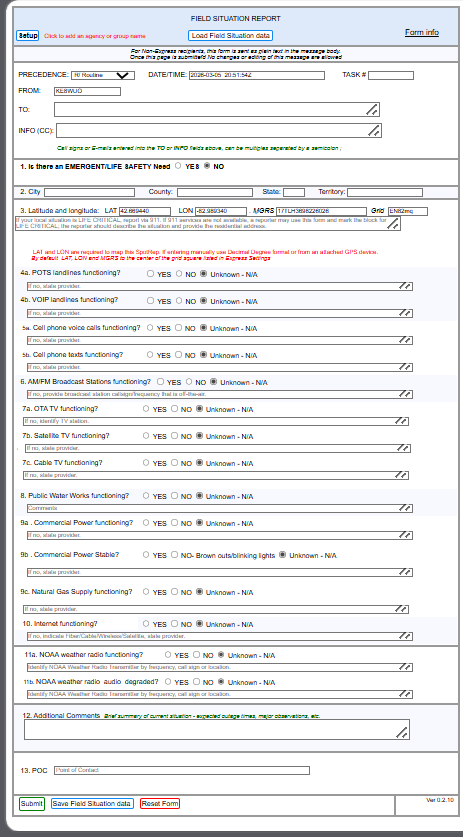
"Submit a Field Situation Report via Winlink describing conditions in your immediate area."
Use the Field Situation Report template and send to MICH-50EOC, CC: KE8WUO
ARPSC Standby & Field Situation Report Exercise
⚠️ Exercise Scenario
Macomb County ARPSC has been notified that the State Emergency Management team has activated amateur radio resources across the region.
At this time, we are very early in the event. The exact cause of the symptoms we're seeing, and the full extent of any service interruptions across the tri-county area, are not yet clear.
ARPSC members have been asked to stage at home and remain on standby for possible deployment or assignment as the situation unfolds.
Tonight's Mission: Field Situation Reports
To help assess the incident and build a clearer picture of what is actually happening at the neighborhood level, State and Macomb County Emergency Management have asked ARPSC to collect Field Situation Reports from our locations.
Your observations—even if they seem routine—help Emergency Management understand the ground truth across the county and identify areas that may need attention.
How to Submit Your Field Situation Report via Winlink
Step-by-Step Instructions:
- Create a new Winlink message
- At the top of the new message window, click "Select Template"
- From the submenu, select "General Forms"
- Choose the "Field Situation Report" template
- Fill out the form with your observations
- Send to the address below
TO:
MICH-50EOC CC:
KE8WUO (John Hagen)
Get Creative!
You're welcome to get creative and submit reports that are fictitious to help test the priority message system and other features—or you can submit an actual, accurate Field Situation Report for your location.
For this drill, there are no wrong answers! We hope you experiment and learn from the experience.
Field Situation Report — Field-by-Field Guide
Not sure what a field means or how to fill it out? Here's a quick reference for each section of the form:
- PRECEDENCE
- Message priority level. R/Routine is the default. Use P/Priority for urgent but non-life-threatening info, I/Immediate for time-critical situations, or LIFE/CRITICAL for life-safety emergencies.
- DATE/TIME
- Auto-filled with current date and time when you open the form.
- TASK #
- Optional. Leave blank unless you've been assigned a specific task number for tracking.
- FROM
- Your callsign (auto-filled from Winlink).
- TO
- The recipient. Enter
MICH-50EOCfor this exercise. - INFO (CC)
- Carbon copy recipients. Enter
KE8WUOto CC John Hagen.
Select YES if you're aware of an immediate life-threatening situation or emergency requiring urgent response in your area.
For this drill, select YES only if you're testing that scenario. If YES, also set PRECEDENCE to LIFE/CRITICAL.
- City
- Your city or township (e.g., Warren, Sterling Heights, Clinton Twp).
- County
- Your county (e.g., Macomb).
- State
- MI (Michigan).
- LAT / LON
- Your latitude and longitude. You can get this from Google Maps, your phone's GPS, or a handheld GPS unit.
- MGRS
- Military Grid Reference System — An alternative coordinate format used by military/emergency services. Optional; leave blank if you don't know it.
- Grid
- Your amateur radio grid square (e.g., EN82). Optional.
- POTS
- Plain Old Telephone Service — Traditional copper wire landline phones. These work even during power outages (the phone company powers them). If you have a landline plugged into a wall jack that isn't internet-based, that's POTS.
- VoIP
- Voice over Internet Protocol — Phone service that runs over the internet. Examples include Vonage, Ooma, MagicJack, or phone service bundled with your internet. These require power and internet to work.
Select YES if working, NO if not working, Unknown if you're not sure, or N/A if you don't have that service.
- Voice calls
- Can you make and receive regular phone calls on your cell phone?
- Texts
- Can you send and receive SMS text messages? (Not iMessage or other app-based messaging)
Note your carrier in the text field (e.g., AT&T, Verizon, T-Mobile).
Are local AM and FM radio stations coming in clearly? Can you pick up stations like WWJ 950, WJR 760, or local FM stations?
If you can, note which station(s) you checked in the text field.
- OTA TV
- Over-The-Air Television — Free TV received via an antenna (like the old "rabbit ears" or a rooftop antenna). Channels like 2, 4, 7, 50, 62, etc. No subscription required.
- Satellite TV
- TV service from a satellite dish. Providers include DirecTV and Dish Network.
- Cable TV
- TV service delivered through a coaxial cable from providers like Xfinity/Comcast, WOW, or bundled with your internet.
Is your municipal water supply working? Turn on a faucet—do you have water pressure? Is the water clear?
If you have a private well, you can note that and report whether your well pump is working.
- Power functioning?
- Do you have electricity? Are your lights on?
- Power stable?
- Is power steady, or are you seeing brownouts (dimming lights), flickering, or brief outages?
- Natural gas?
- If you have natural gas service, is it working? (Check your stove, furnace, water heater, etc.)
Is your internet working? This includes cable internet (Xfinity, WOW), fiber (AT&T Fiber, Verizon Fios), DSL, fixed wireless, or satellite internet (Starlink, HughesNet).
Note your provider in the text field.
NOAA Weather Radio is a nationwide network of radio stations broadcasting continuous weather information from the National Weather Service on special frequencies (around 162 MHz).
- Functioning?
- Can you receive the NOAA Weather Radio broadcast? Local transmitters include KXI-67 (162.475 MHz, Ann Arbor) and WXL-93 (162.550 MHz, Detroit).
- Audio degraded?
- Is the audio quality poor, scratchy, or cutting in and out?
If you don't have a weather radio, select "Unknown" or "N/A."
Use this space for any additional observations:
- Expected outage times if known
- Major observations (downed trees, flooding, road closures)
- Summary of current situation
- Anything else Emergency Management should know
Enter your name or callsign as the Point of Contact for this report. This identifies who submitted the report if follow-up is needed.
Resources
- Winlink Global Radio Email
Learn about Winlink—the worldwide radio messaging system that works when the internet doesn't.
Winlink Downloads
"Accurate, timely field reports are the foundation of effective emergency management."
Stay alert. Report what you see. Help your community.
Announcements
🔐 ACTION REQUIRED: Background Check Consent
All ARPSC Members: Effective immediately, the website now requires consent to a background check. We ask that all members please take a moment to navigate to the website and login. You will be prompted after sign-in with a consent to background check page.
Please complete this consent within the next few days so we can get you fully onboarded. Many of you have been able to sign in and some have yet to sign in.
Password reset links expire! If you cannot or have not yet signed in, we can send you a new link. Please request a password reset link through [email protected], or stay after on the net tonight and let us know if you need a password reset sent to you.
💚 Support ARPSC – Multiple Ways to Give
Please consider supporting Macomb County ARPSC! We have several easy ways to donate, including the Kroger Community Rewards program – you can support us just by shopping at Kroger at no extra cost to you! Check out all the ways you can help.
View Donation OptionsCheck-In List
| # | Call Sign | Unit # | Name | City | Member |
|---|---|---|---|---|---|
| 1 | KE8WUO | 20 | John | Warren | Member |
| 2 | N8VDZ | 2 | Mike | Warren | Member |
| 3 | W8VOX | 30 | Jon | Macomb | Member |
| 4 | N8CAF | 26 | Cliff | Clinton Township | Member |
| 5 | N8WRN | 33 | Gary | Utica | — |
| 6 | KA8UHG | 28 | Steve | Saint Clair Shores | Member |
| 7 | WA4MLD | 18 | Ray | Warren | Member |
| 8 | N8XZ | 5 | Ron | Warren | Member |
| 9 | AD8MP | 35 | David | Saint Clair Shores | Member |
| 10 | W8BPD | 24 | Brian | Warren | Member |
| 11 | KF8ETQ | 23 | Darren | Fraser | Member |
| 12 | N8KNS | 25 | Don | Sterling Heights | Member |
| 13 | W8FU | 7 | Sean | Warren | Member |
| 14 | KE4ZYQ | 16 | Joe | Clinton Township | Member |
| 15 | N8WCB | 6 | David | Sterling Heights | Member |
| 16 | W8VD | 9 | Wally | New Baltimore | Member |
| 17 | N8WRO | 10 | Tim | Richmond | Member |
| 18 | KE8YNU | 1 | Dave | New Haven | Member |
| 19 | KF8DRC | — | Jack | Rochester | — |
| 20 | N8BZR | 27 | Brian | Harrison Township | Member |
| 21 | KF8FGS | 32 | David | Utica | Member |
| 22 | KE8DOT | — | Thomas | Redford Township | — |
| 23 | KE8LAX | 22 | Dean | New Haven | Member |